From Wordpress to Directus, but on what server/domain?

This is Directus official forum, right? Cool, looking forward to build with Directus. :melting_face: I’m not a dev and I have the first of several dummy questions.

My current site is on Wordpress. Now I want to prepare the new backend with Directus until I’m ready to hire a dev and design the frontend. So, one day we’ll remove the current live site and install the new Directus-built frontend on the same domain. So, the question is: where should I install Directus now? On a subdomain, or just a directory under the current /home/?

One first issue I’m encountering is my host saying that Docker is not officially supported by cPanel, as it may interfere with critical services such as Apache, Exim, and networking… therefore I would need to purchase a VPS server that doesn’t have cPanel. This would make my first question even harder: will it be possible to migrate from one server-without-cpanel to the current VPS-with-cpanel that is hosting the domain?

I hope I have made myself clear :upside_down_face:

Hey there @Criss

Great question, and welcome to the Directus community.

To answer your points step-by-step:

Where to install Directus

Since your current live site is running on WordPress, the best approach right now is to install Directus on a subdomain, for example: admin.yourdomain.com

This keeps your live WordPress site untouched while you build and experiment with Directus in the background.
Later, when your new frontend is ready, you can easily switch your main domain (yourdomain.com) to point to the new frontend while keeping Directus running on the subdomain (which acts as your headless CMS backend).

Tip: Most production setups keep Directus on a subdomain even after launch, since it’s not meant to be public-facing.


About Docker and cPanel

Your hosting provider is correct — Docker isn’t officially supported on cPanel-managed servers, because cPanel controls Apache, ports, and networking.
If you want to use Docker (which is the easiest way to deploy and manage Directus), you’ll need a VPS or cloud instance without cPanel (for example, on DigitalOcean, Hetzner, or AWS).

If your current VPS has cPanel, you can:

  • Either install Directus without Docker (manually using Node.js, npm, and a database like MySQL/PostgreSQL).
  • Or get a separate small VPS just for Directus, which is often the cleaner option.

Migration later

Yes, it’s absolutely possible to migrate later from one server to another (even from a non-cPanel VPS to a cPanel VPS or vice versa).
Directus is just a Node.js app with a database — so migration typically involves:

  1. Exporting/importing your database.
  2. Copying your /uploads (or storage) folder.
  3. Copying your .env file and reinstalling dependencies.

That’s it. As long as your database and storage are backed up, you can move Directus anywhere.


In short

  • Install Directus on a subdomain (e.g., admin.yourdomain.com).
  • Avoid cPanel if you plan to use Docker.
  • Migration between servers is straightforward later.
  • Your live WordPress site stays safe while you build your new backend.

There has been a Github discussion regarding cPanel. Seems like the original proposed approaches aren’t working anymore, but it may get you started.

That said, as far as I know, Directus dropped support for Node hosting, among other reasons, due to the dependency issues you mentioned. Hosting on Docker will save both you and your customer a lot of trouble and also make upgrading to new versions much easier.

I really don’t know much about cPanel and it’s limitations, so let me just dump ChatGPTs assessment. Can’t verify it, but most of it sounds reasonable to me. You might get it up and running somehow, but I doubt the, most likely, hours of work are worth it compared to 5-10 bucks/month for a small VPS.

:warning: 1. Process Management (Lifecycle & Stability)

Problem:
cPanel isn’t designed for always-on Node.js processes. Most shared hosts use Passenger (via CloudLinux) to start Node apps on demand — meaning:

  • Your app may stop when idle.
  • It only restarts when the next HTTP request arrives.
  • Crashes aren’t automatically recovered (no process supervisor like PM2 or systemd).

Impact:
Admin API sessions or scheduled tasks can fail unexpectedly. WebSocket connections (used by Directus) can drop or never reconnect properly.


:gear: 2. Memory & CPU Limits

Problem:
Shared cPanel environments usually impose strict per-account resource caps — often:

  • 256–512 MB RAM
  • 1 CPU core (or less shared)

Directus runs a fairly heavy Node process (with database connections, caching, and schema introspection), so:

  • It may hit memory limits during schema sync or file uploads.
  • Crashes (“out of memory”) or unresponsive admin UI can occur under modest load.

Impact:
Performance becomes unstable or the process gets killed by the host’s resource limiter.


:spouting_whale: 3. No Container or Dependency Isolation

Problem:
cPanel environments don’t provide containerized isolation or dependency version pinning.
Directus relies on specific Node and dependency versions (e.g., Node 18+, exact knex/sqlite versions).

Impact:

  • Dependency conflicts between apps.
  • “Works locally, breaks on cPanel” issues.
  • Upgrading Directus can break the environment because dependencies get rebuilt globally.

:locked_with_key: 4. File System Permissions

Problem:
Uploads, extensions, and cache directories need writable access by the same user that runs Node.
But cPanel often uses different users for Apache/PHP and Node processes, with restrictive umask settings.

Impact:

  • Image uploads or cache writes fail (EACCES errors).
  • File permissions need manual fixing via SSH after each deployment.
  • Automatic migrations or logs may silently fail.

:file_cabinet: 5. Database Connectivity

Problem:
Many shared hosts don’t allow local MySQL socket access from Node, or they throttle DB connections.
Remote MySQL access (if used) adds latency and connection timeout risk.

Impact:

  • “Knex: timeout acquiring a connection” errors.
  • Random disconnects during schema operations.
  • Painful debugging since logs are limited in cPanel.

:counterclockwise_arrows_button: 6. Upgrade & Maintenance Difficulty

Problem:
Each Directus upgrade involves npm install and sometimes schema migrations.
Without Docker or CI/CD, you must handle:

  • Dependency updates manually.
  • Potential version conflicts.
  • Restarting the app by hand in cPanel.

Impact:
Upgrades are slow, error-prone, and often break the running instance until manually fixed.


:stopwatch: 7. HTTP Timeout & Proxy Issues

Problem:
Apache (the web server behind most cPanel setups) uses reverse proxy rules to route to your Node app.
If Directus runs on a custom port, Apache’s proxy can:

  • Timeout long API calls (especially uploads or large responses).
  • Fail to preserve WebSocket connections.

Impact:
File uploads or real-time updates in the admin panel can hang or drop.
You may see errors like 502 Bad Gateway or 504 Gateway Timeout.


:puzzle_piece: 8. Limited Environment Variable & Port Flexibility

Problem:
Directus needs multiple environment variables (KEY, SECRET, DB credentials, etc.), but cPanel’s Node app UI is basic — sometimes limited to a handful of vars.
Also, only one port is available per Node app, which can be restrictive if you need multiple instances.

Impact:
Workarounds (like .env files) become necessary and debugging configuration issues is harder.


:package: 9. No Background Jobs or Scheduling

Problem:
Directus can run background tasks (flows, hooks, cron-like operations).
cPanel doesn’t allow persistent background workers or daemons unless you set up a cron job to hit the app periodically — which is fragile.

Impact:
Automations or delayed tasks can fail silently or never trigger.


:toolbox: 10. Logging & Debugging Constraints

Problem:
cPanel provides limited access to Node stdout/stderr.
You can view passenger.log or limited error logs, but not structured Directus logs.

Impact:
Diagnosing API crashes, hook failures, or DB errors becomes cumbersome — especially when multiple processes are spawned.

That is a nice and helpful contribution, thank you! I have also succeeded in installing Directus locally, so that later I will migrate it to the new server, with the help of a developer (or my host). :zany_face:

Thanks a lot for the clarifications, So Docker is not mandatory, I guess I prefer to stay in the same server (subdomain option) then I need to install it with one of the other options. Can I do it not being a developer, maybe following some step-by-step tutorial? Do you know any?

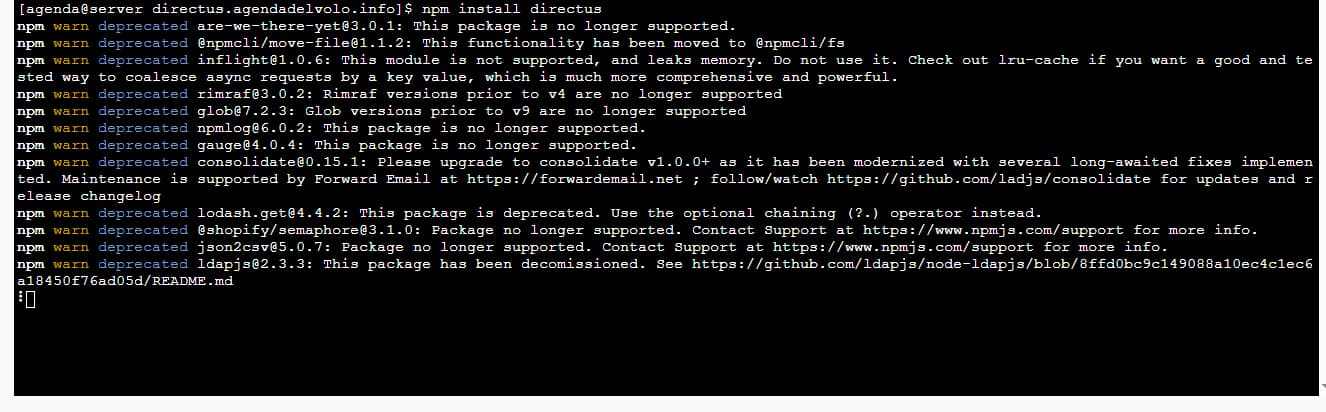
I have followed some tutorials, I have installed node.js + npm + created the database for directus in the subdomain, but while installing Directus I got some deprecated errors. Google AI mentions that the node.js version should be an active LTS, and I thought that installing the latest 22 version would be the best option. What am I doing wrong?

I kept going and tried “npx directus init” command, but I got a “out of memory: cannot allocate Wasm memory” error

I would like to know what problems/conflicts would cPanel really have on Directus. It sounds like even the Node.js/np option is not a good one. That would leave me with installing Directus on my local machine, but then a developer would not have access to it. Sorry for the silly questions but I’m new to these things….

I would highly recommend taking a look at a platform as a service offering like Railway for hosting nowadays. It’s so much easier to manage and maintain than cPanel especially for cloud native applications like Directus

I’m learning. For the moment my client doesn’t want to upgrade the VPS to a dedicated server, neither I want to use other hostings (e.g Railways), thus I must workaround the cPanel issues and install my Directus on a subdomain.

I read about the option of deploying the remote version of Directus via “Git Version Control” inside cPanel. Is that a good idea? Would it be an advantage for the developer, instead of sharing my localhost folder?

I also read that it’s better to use Directus with Postgres instead of MySQL. Is it so?