Error Dialog vs. Custom Error

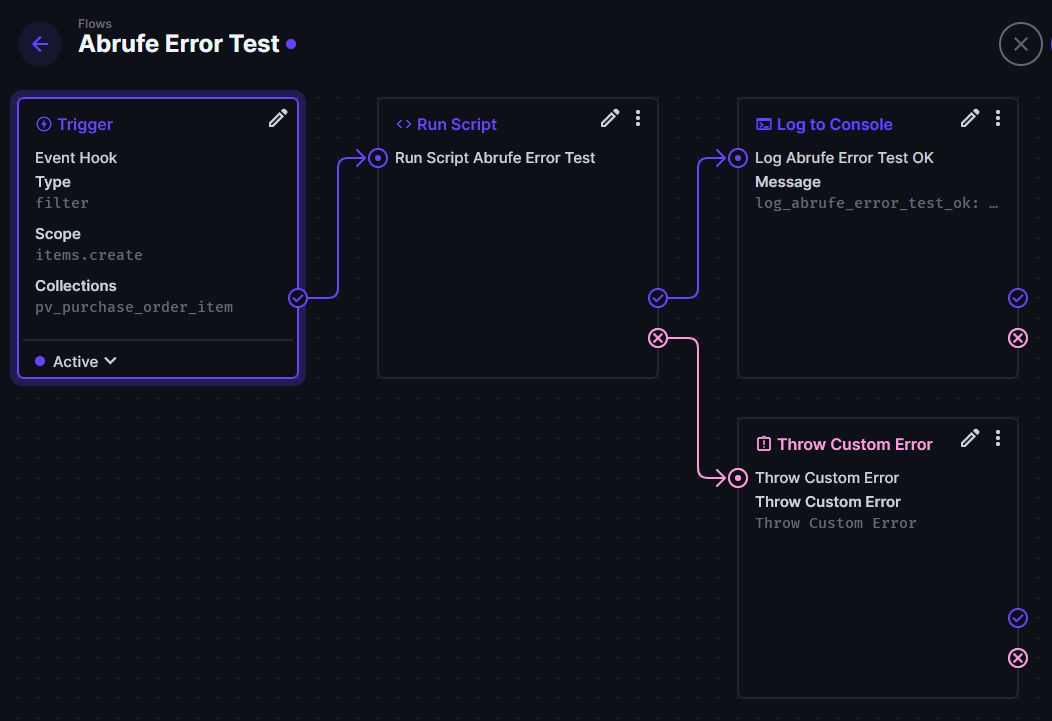
I build a flow: Event Hook Trigger → Run Script

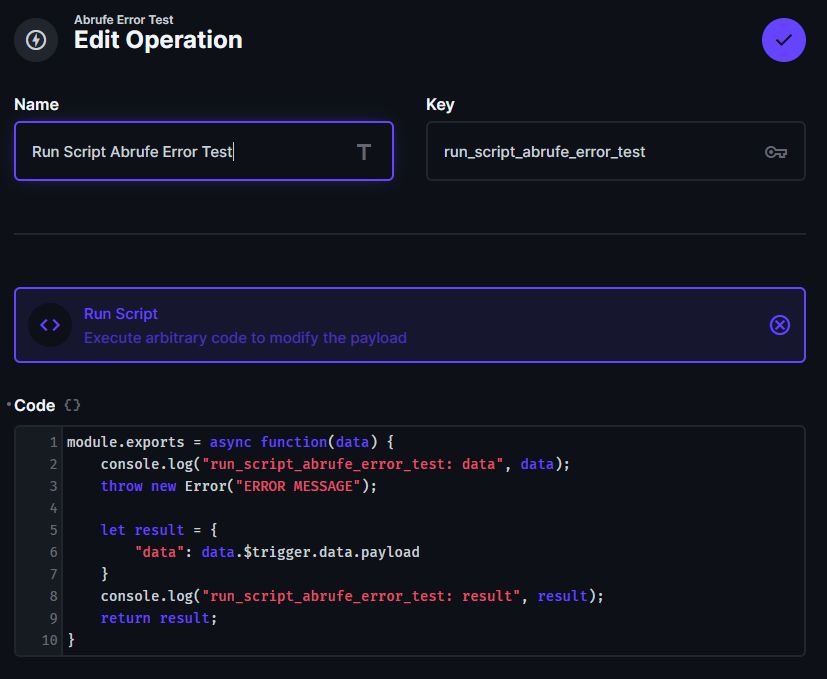
1.) If there is an error I throw the error: throw new Error(“ERROR MESSAGE“);

If I’m an admin, I see the error dialog with the text “ERROR MESSAGE“.
If I’m not the admin, the text is a generic text…!?

Is it possible to display the same error text regardless of authorisation?

2.) Extension “custom error handler”

I tried to resolve this issue using the “custom error handler” extension. I’m using Directus version 11.1.0. Instead of displaying an error dialog, a red error notification appears in the bottom right corner.

How can I display an error dialog instead of the notification?

This error behavior is very strange…

1 Like

Sounds like an issue with the Bulk Import api, would you mind opening an issue in GitHub so the core team can review: https://directus.io/docs/community/reporting-and-support/bug-reporting

Thank you! Appreciate your detailed descriptions and testing.

You can also add a link to this discussion to the issue. :slight_smile:

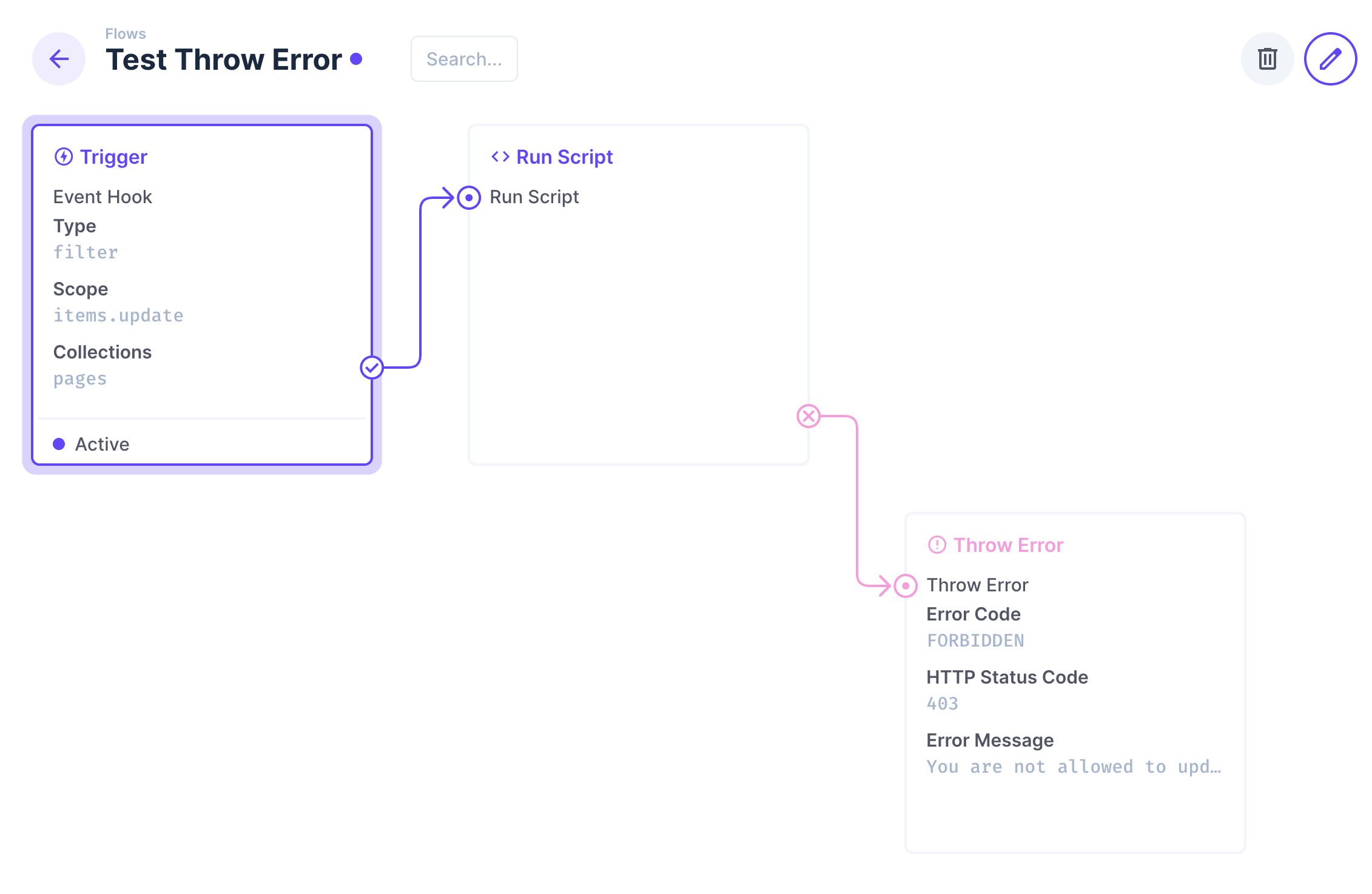
Use the Throw Error operation on the false path to customize the error message. eg:

My test scenario:

Test as admin:

OK!

Test as no-admin:

“ERROR MESSAGE” is not displayed…

Test with custom error handler:

Error output: custom error handler

Ok it took a couple of reads to understand the issue you are facing. Let me ensure I understand:

  • Create Flow with filter(blocking) trigger on item create
  • Create item in Data Studio with plus(+) icon on the collection
    • Custom flow error message shown for both admin & non-admin – correct?
  • Bulk Import items in Data Studio
    • Custom flow error message only shows when admin - non-admin gets generic error Is this correct?​

If it is the second issue, eg the Bulk Import is not returning the custom message, then please open an issue: https://directus.io/docs/community/reporting-and-support/bug-reporting

The error dialog is only displayed if an item is created manually. A red notification is displayed during import.

Sorry for my unclear description, jonathanwagner

Event Hook-Trigger: items.create, filter(blocking)
Test-Szenario 1: Admin, Create Item, throw new Error(“create item”) → [INTERNAL_SERVER_ERROR] item create (OK)
Test-Szenario 2: Admin, Import CSV, throw new Error(“create item”) → [INTERNAL_SERVER_ERROR] item create (OK)
Test-Szenario 3: Admin, Create Item, Custom Error(FORBIDDEN, “Custom Error”, 403) → [FORBIDDEN] Custom Error (OK)
Test-Szenario 4: Admin, Import CSV, Custom Error(FORBIDDEN, “Custom Error”, 403) → Red Notification → Forbidden (Not OK)

Table-Permissions: Create, Read, Update, Delete (All Access)
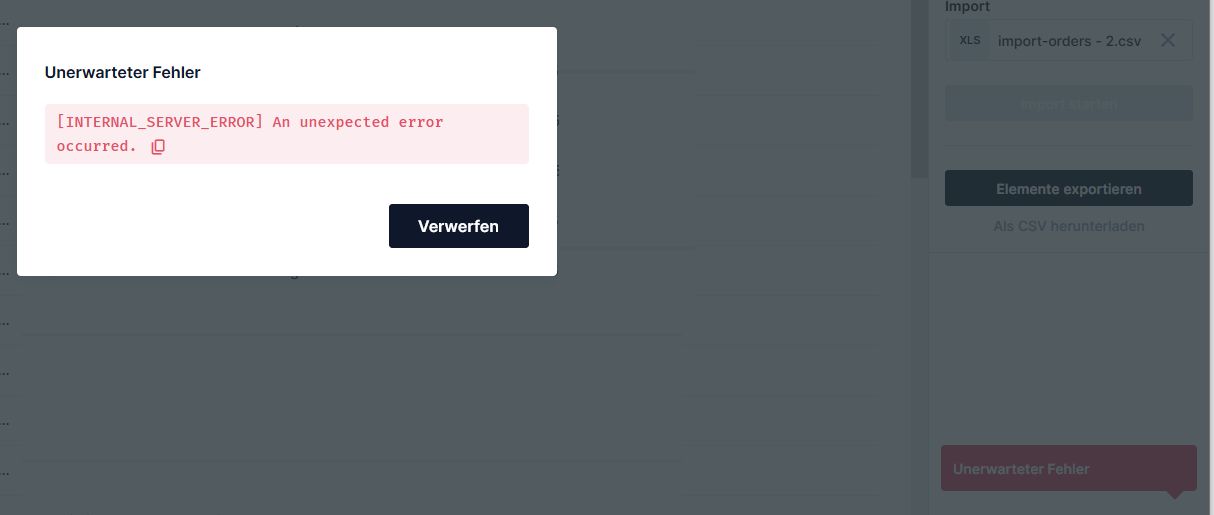
Test-Szenario 5: No-Admin, Create Item, throw new Error(“create item”) → [INTERNAL_SERVER_ERROR] An unexpected error occurred. (Not OK)
Test-Szenario 6: No-Admin, Import CSV, throw new Error(“create item”) → [INTERNAL_SERVER_ERROR] An unexpected error occurred. (Not OK)
Test-Szenario 7: No-Admin, Create Item, Custom Error(FORBIDDEN, “Custom Error”, 403) → [FORBIDDEN] Custom Error (OK)
Test-Szenario 8: No-Admin, Import CSV, Custom Error(FORBIDDEN, “Custom Error”, 403) → Red Notification → Forbidden (Not OK)

  • Create Flow with filter(blocking) trigger on item create
    → Correct

  • Create item in Data Studio with plus(+) icon on the collection

    • Custom flow error message shown for both admin & non-admin – correct?
      → Correct!
  • Bulk Import items in Data Studio

    • Custom flow error message only shows when admin - non-admin gets generic error Is this correct?​
      → No… Bulk import shows a red notification instead of an error dialog

Tests with Directus v11.13.2

Event Hook-Trigger: items.create, filter(blocking)
Test-Szenario 1: Admin, Create Item, throw new Error(“create item”) → [INTERNAL_SERVER_ERROR] item create (OK)
Test-Szenario 2: Admin, Import CSV, throw new Error(“create item”) → [INTERNAL_SERVER_ERROR] item create (OK)
Test-Szenario 3: Admin, Create Item, Throw Error(INVALID_PAYLOAD, “INVALIDPAYLOAD”, 405) → [INVALID_PAYLOAD] INVALID PAYLOAD (OK)
Test-Szenario 4: Admin, Import CSV, Throw Error(INVALID_PAYLOAD, “INVALIDPAYLOAD”, 405) → [INVALID_PAYLOAD] INVALID PAYLOAD (OK)
Test-Szenario 5: Admin, Create Item, Custom Error(FORBIDDEN, “Custom Error”, 403) → [FORBIDDEN] Custom Error (OK)
Test-Szenario 6: Admin, Import CSV, Custom Error(FORBIDDEN, “Custom Error”, 403) → [FORBIDDEN] Custom Error (OK)

Table-Permissions: Create, Read, Update, Delete (All Access)
Test-Szenario 7: No-Admin, Create Item, throw new Error(“create item”) → [INTERNAL_SERVER_ERROR] An unexpected error occurred. (NOK)
Test-Szenario 8: No-Admin, Import CSV, throw new Error(“create item”) → [INTERNAL_SERVER_ERROR] An unexpected error occurred. (NOK)
Test-Szenario 9: No-Admin, Create Item, Throw Error(INVALID_PAYLOAD, “INVALIDPAYLOAD”, 405) → [INVALID_PAYLOAD] INVALID PAYLOAD (OK)
Test-Szenario10: No-Admin, Import CSV, Throw Error(INVALID_PAYLOAD, “INVALIDPAYLOAD”, 405) → [INVALID_PAYLOAD] INVALID PAYLOAD (OK)
Test-Szenario11: No-Admin, Create Item, Custom Error(FORBIDDEN, “Custom Error”, 403) → [FORBIDDEN] Custom Error (OK)
Test-Szenario12: No-Admin, Import CSV, Custom Error(FORBIDDEN, “Custom Error”, 403) → [FORBIDDEN] Custom Error (OK)